Ezi-Dialer Platform

Predictive Dialer Software Built for Outbound Call Centres

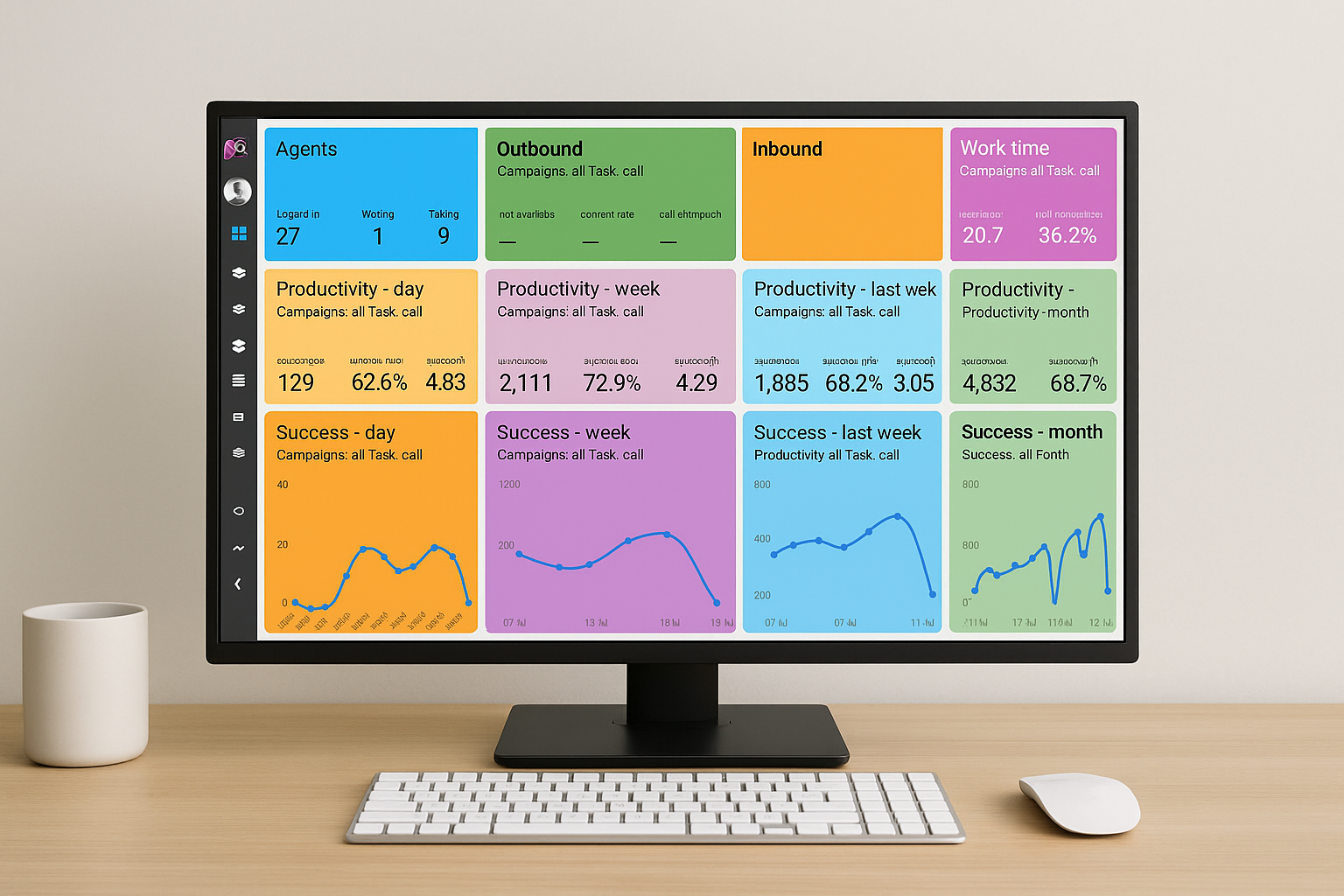
Dashboard
Ezi-Dialer dashboard
Campaigns
Ezi-Dialer campaign screen
Agent Screen
Ezi-Dialer agent screen
Reporting
Ezi-Dialer reporting screen

Launch campaigns faster, support agents better, and manage outbound performance from one cloud-based dialer.

Supervisor Tools Live Coaching Supervisors can coach agents during calls without the customer hearing.
Performance Real-Time Visibility Track campaigns, agents, and call outcomes with live reporting tools.
WHAT IS EZI-DIALER

Smart outbound dialing built for performance-driven call centres

Ezi-Dialer is a cloud-based predictive dialer that automatically dials numbers and connects agents only when a call is answered. It helps outbound teams reduce idle time, improve talk time, and manage campaigns more efficiently.

The platform includes predictive, power, preview, and manual dialing modes, plus supervisor tools, live coaching, reporting, call recordings, and campaign management in one web-based system.

Predictive, Power, Preview, and Manual Dialing
Supervisor Monitoring, Whisper Coaching, and Call Recording
Real-Time Reporting, Campaign Management, and Analytics
Ezi-Dialer product overview
Cloud-Based
Supervisor Tools
Reporting
Remote Ready

Cloud-Based Setup

No hardware required. Agents and supervisors can access the platform through a web browser.

Remote & Office Teams

Run outbound campaigns from the office or support remote agents without changing your workflow.

Supervisor Control

Monitor live activity, coach agents during calls, review outcomes, and track team performance.

DIALING MODES

Choose the right dialing mode for your campaign

Best for high-volume campaigns

Predictive Dialing

Predictive dialing automatically dials multiple numbers at the same time and connects answered calls to available agents. This helps reduce idle time and increase talk time across outbound teams.

Keeps agents focused on live conversations instead of manual dialing
Ideal for sales, collections, and outbound campaigns with large lead volumes
Improves operational efficiency by reducing waiting time between calls
Ezi-Dialer agent and task screen
Best for steady outbound flow

Power Dialing

Power dialing automatically calls the next number for each agent after a call is completed. It keeps teams moving consistently while giving agents a more controlled one-call-at-a-time workflow.

Maintains steady agent activity without manual dialing
Good for sales teams, follow-ups, and structured outbound campaigns
Offers a balance between automation and agent control
Ezi-Dialer power dialing workflow screen
Best for high-context conversations

Preview Dialing

Preview dialing allows agents to review customer or lead information before placing a call. This is useful when calls require more context, preparation, or a more personalized approach.

Lets agents review lead details before starting the conversation
Useful for collections, account management, and sensitive call workflows
Supports higher-quality interactions when accuracy matters
Ezi-Dialer preview dialing lead review screen
Best for complete call control

Manual Dialing

Manual dialing gives agents full control over when and how they place calls. It is useful for special workflows, one-off outreach, or teams that need flexibility in how they manage conversations.

Useful when agents need to control call pacing themselves
Supports custom workflows and smaller targeted calling activities
Ideal when flexibility matters more than automation
Ezi-Dialer manual dialing screen
AGENT FEATURES

Give agents the tools to work faster and stay focused

Ezi-Dialer gives agents a web-based workspace to manage calls, view lead details, update outcomes, add notes, and move through campaigns with less friction and better visibility.
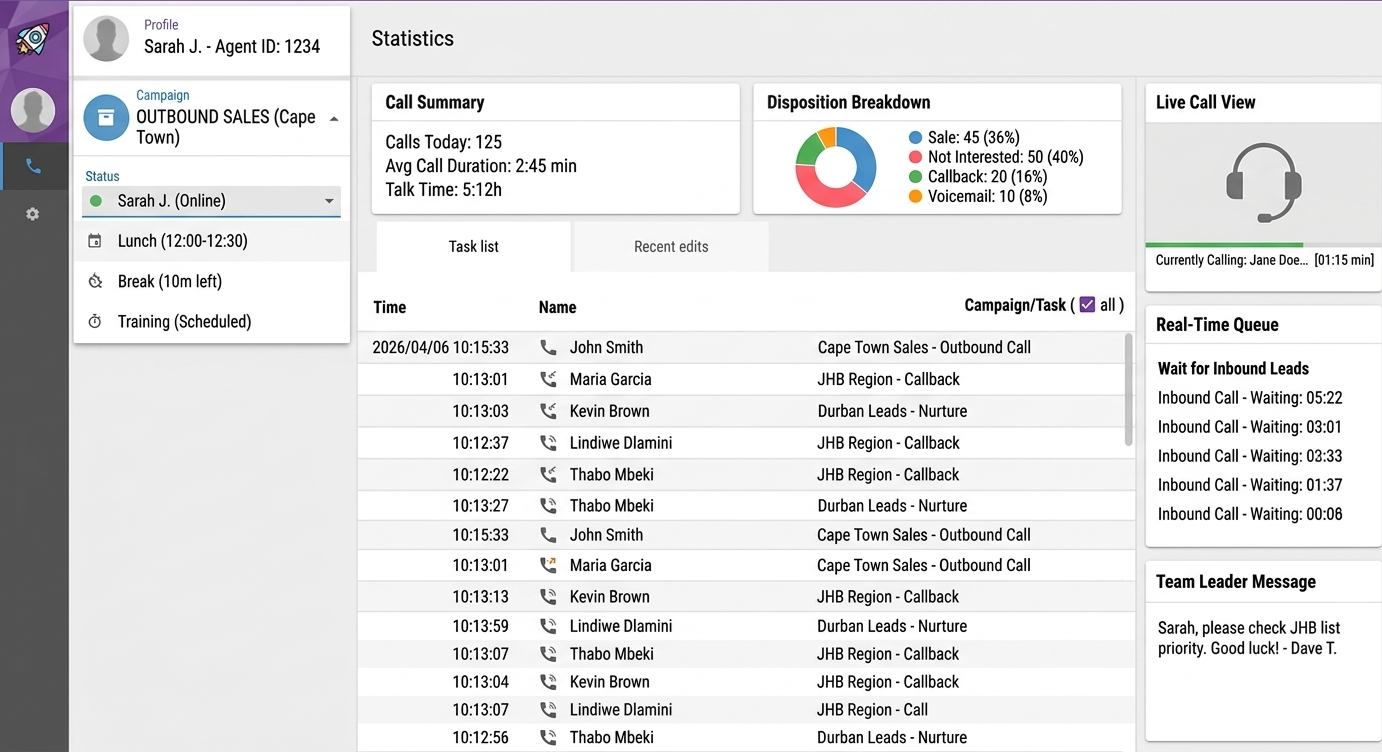
Ezi-Dialer agent dashboard

Web-Based Agent Dashboard

Agents can log in from the office or remotely and work from a clean dashboard that keeps task flow, lead details, and campaign activity in one place.
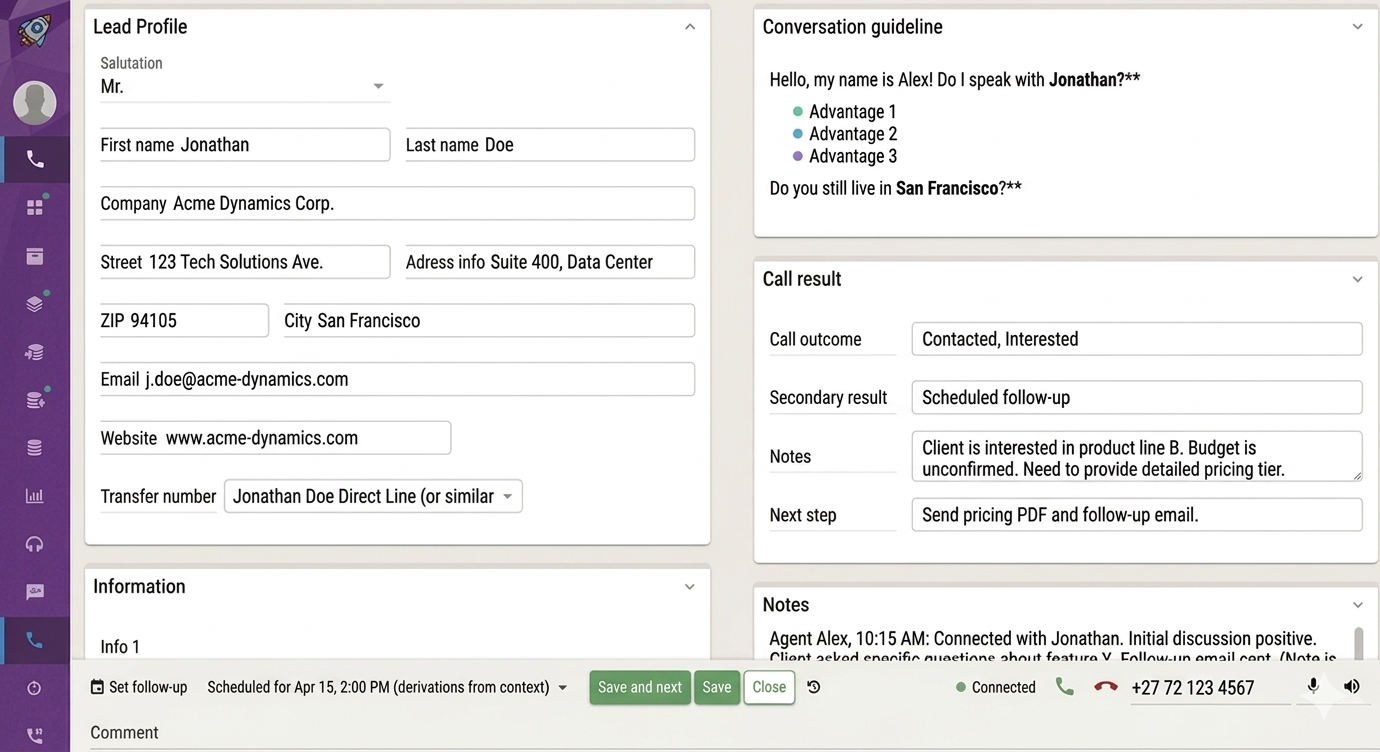
Ezi-Dialer call screen

Call Controls and Live Handling

Give agents practical tools for live conversations, call handling, customer context, and smoother call flow throughout the campaign.

Ezi-Dialer lead list

Lead Lists, Notes, and Follow-Ups

Agents can work through structured lead lists, review history, capture notes, and manage follow-ups so no lead is lost in the process.
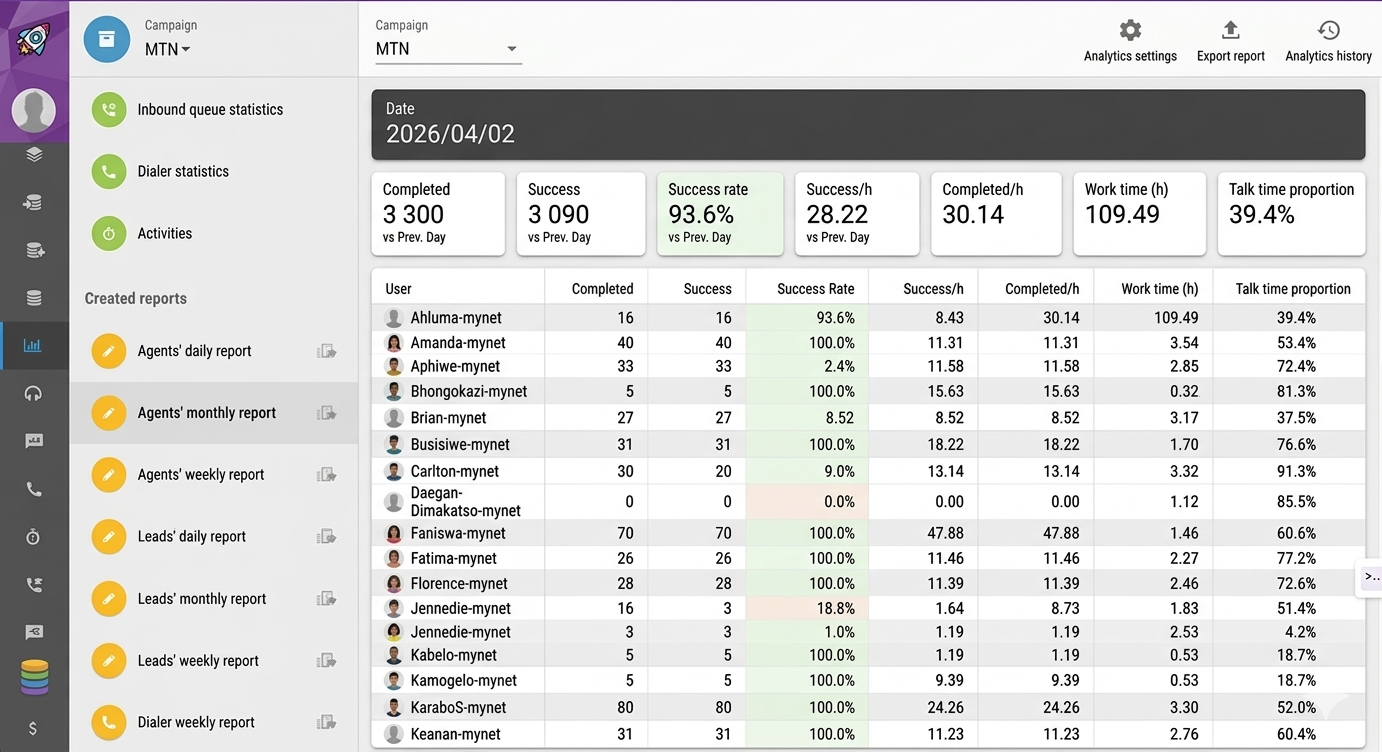
Ezi-Dialer analytics dashboard

Real-Time Performance Insight

Track activity, productivity, and campaign outcomes with analytics that help teams improve efficiency, call quality, and overall outbound performance.

SUPERVISOR TOOLS

Full control and visibility for your call centre

Supervisors and managers get real-time visibility into campaigns, agents, and call activity. Monitor performance, review calls, coach agents live, and keep campaigns running efficiently from one place.

📊

Real-Time Dashboards

View live campaign statistics, agent status, call outcomes, and performance metrics from a central supervisor dashboard.

👥

Agent Performance Tracking

Track calls made, talk time, answer rates, and agent productivity to identify top performers and support agents who need improvement.

📞

Call Recording & Review

Access call recordings for quality assurance, training, and dispute resolution, helping improve overall campaign performance.

⚙️

Campaign Management

Manage campaigns, upload leads, adjust dialing modes, and control agent activity from one centralized system.

🔐

User Roles & Permissions

Control access levels for agents, supervisors, and administrators to ensure proper system control and data security.

🎧

Live Call Monitoring & Whisper Coaching

Listen to live calls, coach agents during conversations without the customer hearing, and step in when needed to support your team.

AI AUTOMATION

Extend your dialer with AI bot and automation workflows

Ezi-Dialer can support AI-powered engagement, automated call flows, and scripting logic that helps teams scale outreach, improve consistency, and reduce manual effort in repetitive campaign tasks.

AI bot minutes can be layered into your monthly usage model

Support custom campaign logic and automated interaction paths

Useful for follow-up flows, scripted engagement, and higher efficiency

AI Bot Ready Usage-based AI bot billing can be estimated in the system calculator.
Automation Friendly Custom and scripted workflows help teams standardize execution at scale.
REPORTING & SETUP

See performance clearly. Start dialing fast.

Ezi-Dialer gives managers and supervisors the visibility they need to track campaign performance, monitor agent productivity, and make faster decisions, while keeping onboarding simple enough to get teams dialing quickly.

Reporting & Analytics

Live reporting that helps you manage with confidence

Track performance across campaigns, teams, and individual agents with reporting tools designed to give supervisors a clearer view of what is working, where support is needed, and how outbound activity is performing in real time.

Real-time campaign dashboards with live activity and outcome tracking
Agent productivity insight including talk time, calls made, and answer rates
Performance visibility to identify top performers and optimize campaign efficiency
Ezi-Dialer analytics overview
Ezi-Dialer reporting dashboard
How It Works

Simple setup. Fast start.

1

Choose your setup

Use Ezi-Dialer with your existing voice provider or bundle it with Pixel Voice high-volume voice for a complete outbound calling setup.

2

We configure your dialer

We provision the dialer environment, user access, campaign setup, and dialing modes so your team is ready to begin without unnecessary delays.

3

Start dialing

Agents log in, launch campaigns, and begin working. In many cases, teams can start dialing in under 5 minutes once setup is complete.

INTEGRATIONS

Works with your existing VoIP, SIP and call centre setup

Ezi-Dialer integrates with SIP trunks, VoIP providers, and your existing call centre environment, so you can launch outbound campaigns without replacing your current infrastructure.

Ready to see Ezi-Dialer in action?

Book a demo with our team and see how Ezi-Dialer can help your call centre increase productivity, reduce idle time, and manage outbound campaigns more efficiently.

PRICING

Flexible pricing built for outbound teams at any scale

Choose the commercial model that fits your operation, from lighter startup teams to serious high-volume calling environments.

All plans support cloud dialer access, browser-based calling, and campaign control.
Best for smaller teams

PAYG

R100 / user / month

Flexible for startup and lighter-volume operations where fixed commitment matters more than bundled inclusions.

  • System billed 19.5c/min
  • Recording billed 6.5c/min
  • AI Bot billed 19.5c/min
  • Custom billed 7.15c/min
  • Scripting billed 7.15c/min
  • Mobile calls 48c/min
  • Landline calls 35c/min
  • Support Mon to Fri, 08:00 to 17:00
Request Demo
Best for serious teams

ALL-IN-ONE

R971 / user / month

Best for serious operations that want the strongest bundled value, lower effective rates, and higher support confidence.

  • Minimum 10 users
  • System included
  • Recording included
  • AI Bot billed 11.05c/min
  • Custom included
  • Scripting included
  • Mobile calls 27c/min
  • Landline calls 20c/min
  • 24/7 telephonic + ticket support
  • Volume discounts available
Get Started
COST CALCULATORS

Estimate platform and destination costs before you commit

Use these calculators to estimate your monthly dialer cost, outbound destination spend, and total projected monthly cost based on your selected plan and usage.

System Cost Calculator

Estimate monthly platform and feature costs based on your selected plan, seat count, and expected feature usage.

Select the commercial model you want to test.
ALL-IN-ONE applies a minimum 10-user rule.
Monthly minutes affected by system pricing.
Recorded monthly minutes.
Monthly AI voice or bot engagement minutes.
Usage tied to custom campaign logic.
Minutes affected by campaign scripting.
Only affects PAYG in this version.
Estimated monthly system cost R 0.00
CORE looks strongest for a balanced commercial setup.

Destination Cost Calculator

Estimate outbound spend based on expected mobile and landline calling volume.

Estimated destination cost R 0.00
Mobile and landline rates vary by plan. International rate can be adjusted manually.
COMBINED MONTHLY ESTIMATE

Total projected monthly cost

Subscription, feature usage, setup, and destination spend brought together in one view.

R 0.00
FAQ

Questions teams usually ask before getting started

Here are some of the most common questions about Ezi-Dialer, setup, pricing, and how the platform works in a real outbound environment.

What is Ezi-Dialer used for?
Ezi-Dialer is used for outbound calling campaigns such as sales, collections, lead follow-up, customer engagement, and other high-volume call centre operations.
Can Ezi-Dialer work with remote agents?
Yes. Ezi-Dialer is cloud-based, which means agents and supervisors can log in and work from the office or remotely, depending on your setup.
Does the system support predictive, power, and preview dialing?
Yes. Ezi-Dialer supports predictive dialing, power dialing, preview dialing, and manual dialing so teams can choose the workflow that best suits their campaign.
Can supervisors monitor and coach agents during live calls?
Yes. Supervisors can monitor live calls and use whisper coaching to guide agents during conversations without the customer hearing the coaching.
Do I need to replace my existing VoIP or SIP setup?
Not necessarily. Ezi-Dialer can work with existing SIP and VoIP environments, depending on your current setup and commercial requirements.
How quickly can we get started?
Once provisioning and configuration are complete, teams can often start dialing very quickly. The exact timeline depends on setup requirements, users, and voice configuration.
READY TO GET STARTED?

See how Ezi-Dialer can work for your call centre

Speak to our team about your campaign size, voice requirements, and commercial model. We’ll help you choose the right setup and get your team ready to dial.

    Scroll to Top